
Custom GPTs empower users to develop personalized AI assistants tailored for specific tasks, industries, or workflows, all without requiring coding expertise. Users can create custom GPTs without coding skills by simply providing instructions, uploading documents, and integrating external resources.
The guide offers a straightforward approach to defining instructions, uploading documents, and incorporating third-party tools.
What Are Custom GPTs?
Custom GPTs are individualized versions of ChatGPT that users can customize for specific tasks, topics, or workflows without the need for coding knowledge.
Introduced by OpenAI in November 2023, these adaptable AI assistants are built within the ChatGPT platform and can be enriched with custom instructions, uploaded documents, and integrations with external tools.
If you’re new to ChatGPT and wish to establish a solid foundation, consider exploring Great Learning’s Free ChatGPT for Beginners course.
Key Features of Custom GPTs
- No-Code Customization: Users can create GPTs by providing instructions and optional data, eliminating the need for programming knowledge.
- Domain-Specific Knowledge: By uploading relevant documents, GPTs can be fine-tuned to understand and operate within specific industries or topics.
- Third-Party Integrations: Custom GPTs can connect with external applications via APIs, enabling functionalities like web browsing or workflow automation.
- Flexible Sharing Options: Creators can keep their GPTs private, share them via direct links, or publish them publicly in the GPT Store.
Step-by-Step: How to Create a Custom GPT
1. Accessing the GPT Builder
To create your own Custom GPT, the first step is accessing the GPT builder in the ChatGPT interface. This can be done directly from the ChatGPT platform by following these simple steps:
- Login to ChatGPT: Head to ChatGPT and sign in with your OpenAI account.

- Navigate to GPTs: On the homepage, click on the “Explore GPTs” button to open the GPT Store. You’ll find an option to create a Custom GPT in the top right corner.

- Start Building: Click on “Create a New GPT,” which will take you to the interactive GPT builder where you can customize the assistant according to your needs.

2. Using the Walkthrough Wizard
The interactive GPT builder comes with an intuitive walkthrough wizard that guides you through the entire process, making it seamless even for those new to creating custom AI tools.
- Introduction to the Builder: The wizard explains the main steps, including defining GPT instructions, uploading relevant files, and configuring external integrations.
- Templates for Easy Setup: The walkthrough provides predefined templates for creating GPTs in specific categories (e.g., customer service, educational assistance), saving time by requiring only minor adjustments to get started.
- Drag-and-Drop Functionality: The builder allows you to upload files or connect APIs using a simple drag-and-drop interface, bringing your custom GPT to life more easily.
For more detailed information on how ChatGPT works, refer to our article on What Is ChatGPT and How Does It Work?
3. Defining GPT Instructions

After getting acquainted with the GPT builder, it’s time to define the core instructions that will govern your GPT’s behavior, allowing for true customization.
- Instruction Clarity: Start by providing clear and concise instructions on what you want your GPT to accomplish.
For example, if creating a GPT for customer service, the instructions could be: “Provide helpful and empathetic responses to customer inquiries about product specifications and shipping details.”

- Personalization for Specific Tasks: Add personalized instructions to adjust the tone, style, or domain knowledge. For instance, program your GPT to respond formally or informally based on the audience.
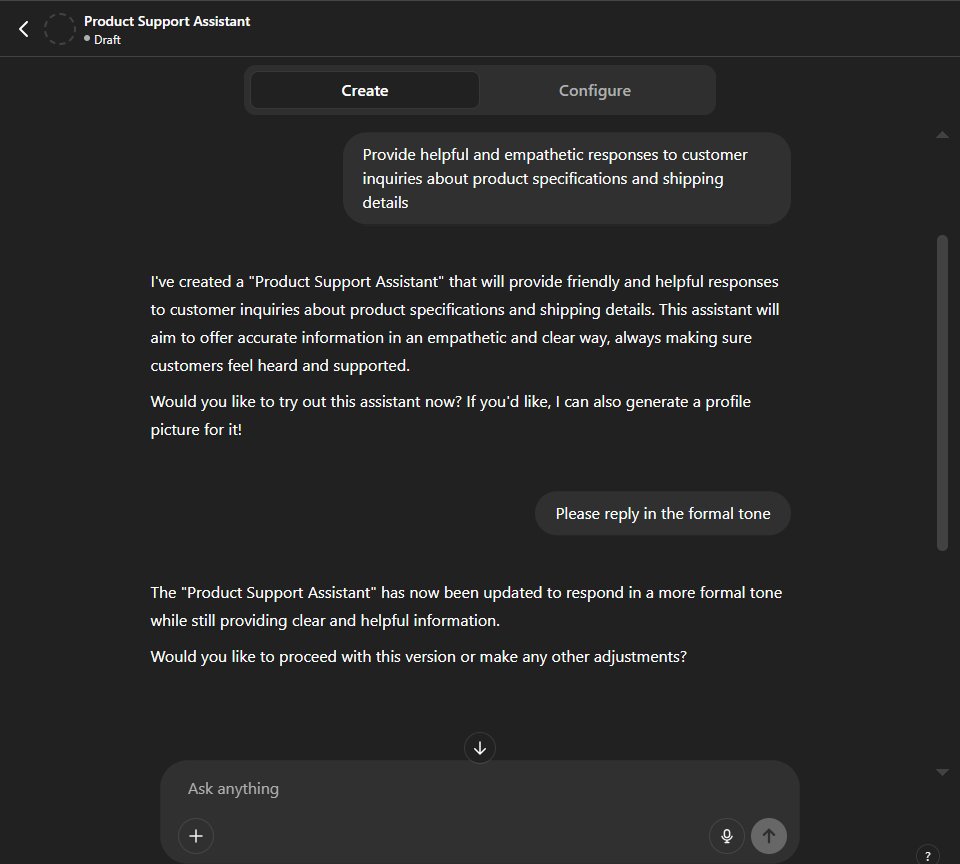
- Use External Knowledge: If your GPT requires specific data access (e.g., product databases or research papers), upload these files during this step to ensure the GPT can retrieve relevant information during interactions.
- Integration with APIs: Integrate your GPT with external services such as a CRM system or analytics platform to provide data-driven insights, manage customer records, or automate workflows.

Also Read: Get Started with ChatGPT API