
Top five key takeaways (and why they are important)
- Computer vision is not magic: While it may not solve problems directly, it can provide valuable insights that empower action.
- Start small: Beginning with a well-defined use case, such as detecting forklift near-misses, can yield quick results and tangible benefits.
- Utilize existing infrastructure: Leveraging your current hardware or systems can accelerate implementation and scalability.
- Embrace iteration: Success comes from continuous improvement and adaptation, not perfection from the start.
- Prepare for the future: Address current challenges while laying the groundwork for future needs and expansions.
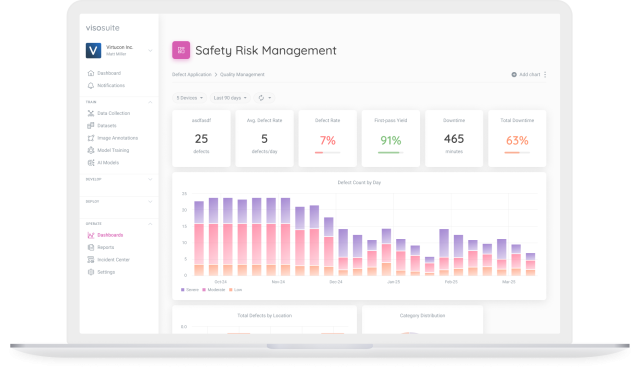
Why Choose Computer Vision and Why Now?
Computer vision has the potential to drive rapid transformations by converting visual data into actionable insights. The increasing adoption of computer vision is fueled by:
Automation Objectives
Businesses are embracing AI to automate tasks, and computer vision offers a solution for automating manual oversight processes.
Optimizing Existing Infrastructure
Companies are looking to extract more value from their investments in camera systems by utilizing the data they generate.
As costs decrease and AI expertise grows, computer vision becomes more accessible for organizations seeking to address specific operational challenges. While it’s not a quick fix, it provides valuable insights to drive intelligent decision-making. Let’s explore real-world applications.
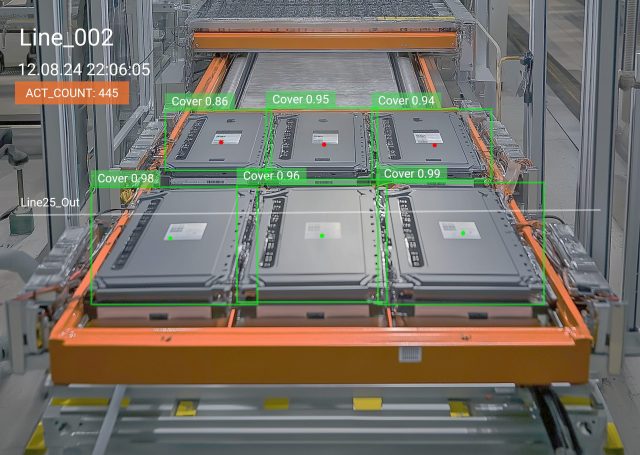
Real-World Applications: From Factory Floors to Warehouses
Quality assurance, parcel scanning, and health and safety monitoring are three impactful use cases that highlight the value of computer vision.
Implementing computer vision can significantly enhance business operations, particularly in the manufacturing sector.
Quality Assurance (QA)
A manufacturer optimized machine processes, but human error was still a risk.
Computer vision now monitors workbenches round the clock, alerting QA teams to process deviations instantly, thereby improving quality and compliance.
Detecting defects in real-time can revolutionize quality assurance by identifying issues as they occur, leading to waste reduction and enhanced consistency.
Parcel, Package, and Pallet Scanning
In logistics, manual spot checks on damaged items were inadequate.
Computer vision streamlines the quality assessment of goods throughout the supply chain by automatically detecting anomalies, such as scanning for barcodes and assessing item conditions.
Health and Safety Monitoring
Health and safety managers cannot be everywhere at once.
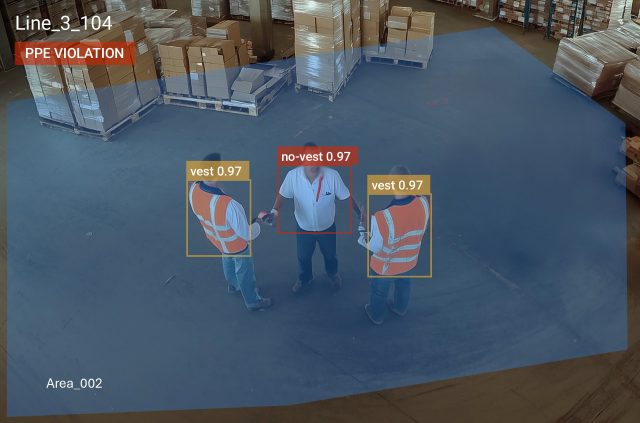
Computer vision systems can identify compliance with safety protocols, risky behaviors, and near-miss incidents, providing safety leaders with real-time insights to prevent accidents.
Implementing Computer Vision: Where to Begin?
Starting small with impactful use cases, such as forklift near-miss detection or QA automation, is recommended by viso. Consider:
- Do you know the current incident rate or errors in your processes?
- Can you quantify the cost of these incidents and their impact?
- What manual visual inspections are currently being performed?
Utilize your existing cameras or video management systems for cost-effective implementation. Data collection is the first step, creating a dataset for the model to learn from.
Choosing the Right Technology: Prioritize Flexibility
Edge devices offer optimal performance and privacy, so consider factors like environment, camera streams, and budget when selecting hardware.
- Environment: Is it a factory floor or a climate-controlled setting?
- Cameras: How many streams need to be managed?
- Budget: What is your cost range?
Entry-level setups can start at $5-8k for a single location, but costs vary based on specific requirements. Software flexibility is crucial for adapting and scaling your models effectively.
Your first model is just the beginning; choose a platform that allows for rapid iteration and adjustment as your needs evolve.
Transitioning from Pilot to Production: What to Expect
Keep the scope tight:
Your first pilot should go live in 6–8 weeks, starting at one location before scaling.
Retraining models is efficient:
Retraining a model for a new location can take as little as 2–3 weeks.
Iterate for improvement:
Obtain real-world feedback, identify trends, and refine your processes based on insights gained from live operations.
Avoid waiting:
Start with collecting data and be proactive in implementing computer vision solutions for your business needs.
Planning for Scale and Success
- Expand to new sites with minimal model adjustments.
- Develop additional use cases within the same location.
- Engage your data team to analyze patterns and inform operational decisions.
When selecting providers, be cautious of promises of instant solutions, as successful implementations often require refinement and fine-tuning.
Final Thoughts: Embracing Computer Vision
Computer vision offers immense value across various sectors, transforming how businesses operate and make decisions.
The real excitement lies not just in the technology itself but in the shift towards data-driven decision-making for safer environments and more efficient operations.
Remember, the potential of computer vision is ripe for exploration and implementation right now.
It’s simpler than you think. Start small, take action, and unlock the benefits of computer vision today!